Type without speaking, search your chats: what’s new in Chesly for G2
The Chesly team
The Chesly team
Call people on WhatsApp, Telegram and Signal without leaving Chesly, keep up with WhatsApp statuses, and let AI sort put the chats that need you first. Here’s what’s in Chesly 1.2.
Bring iMessage in through a Mac you leave on, keep one conversation per person, and vote in polls. Here’s what we shipped since August.
Chesly 1.3 for Even Realities G2 is out on Even Hub. You can now reply from your glasses without saying a word, find any chat in a few moves, and keep the email folders you use most at the top.
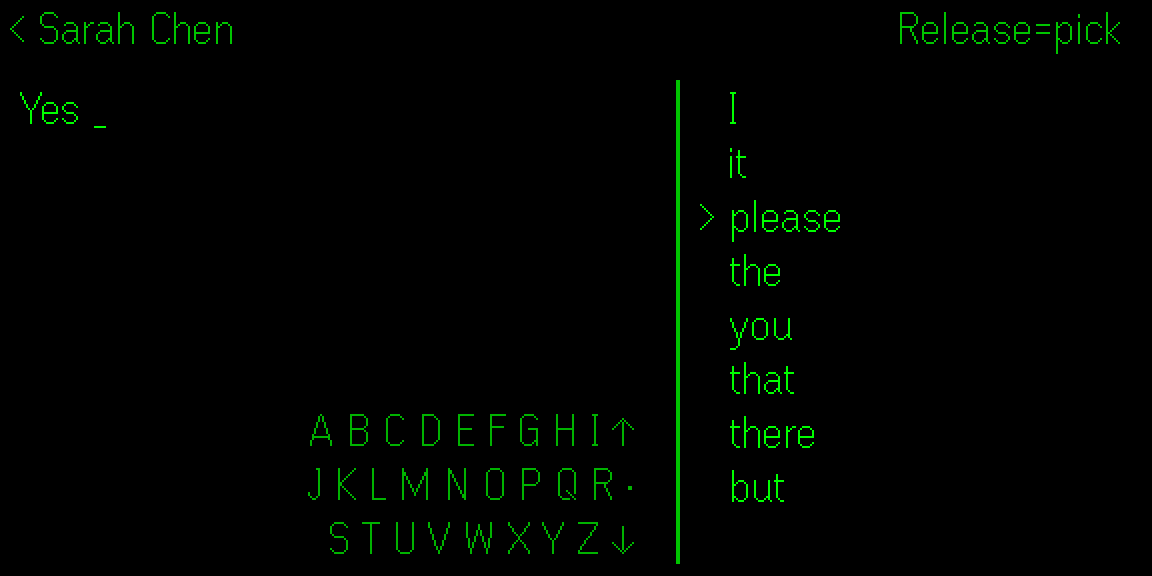
Saying a reply out loud isn’t always an option, like on a quiet train or in a meeting. Now you can type it instead, with the same swipes and taps you use to get around Chesly.
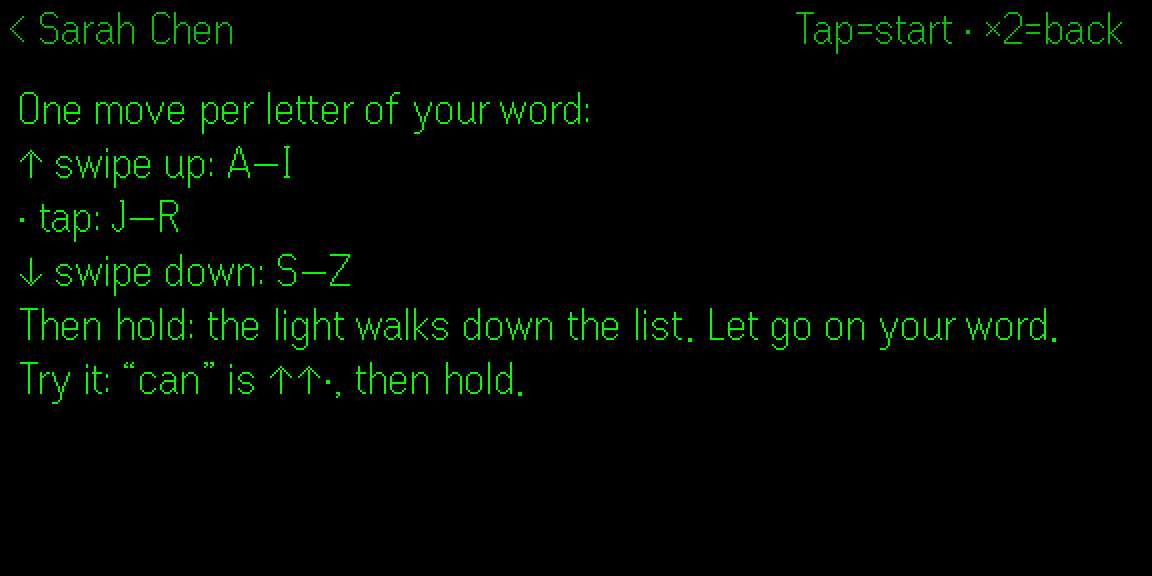
In a chat, swipe down to Type, just below Reply, and tap. Each letter of your word is one move: swipe up for A to I, tap for J to R, swipe down for S to Z. The word list narrows with every move. Then hold, and let go when the light reaches your word. After the first word, the list suggests what comes next, so sometimes you only need to hold.
A short hold opens Tools, with punctuation, numbers and Spell a word for anything the list doesn’t know. Review & send shows the whole message before it goes. The first time you type, a short guide on the glasses shows you how it works.
Typing works in 14 languages: English, Czech, Danish, Dutch, Finnish, French, German, Hungarian, Italian, Norwegian, Polish, Portuguese, Spanish and Swedish. Turn on the ones you write in under Typing in the Chesly plugin on your phone, and each chat types in the language you use there. Typing learns your words from the messages you send, and what it learns stays on your phone. You can turn that off or reset it in the same place.
Typing is part of Chesly Plus. It’s built on Silent input by akelu of OcuClaw.
Hold on the chats list and type a name the same way, one move per letter. The chats narrow as you go. Then hold, and let go on the one you want. Search finds your archived chats too, and it doesn’t need Chesly Plus.
Voice replies, also part of Chesly Plus, now let you choose from all 60 languages Chesly transcribes, including Croatian, Serbian, Tagalog, Swahili and Welsh. Pick up to five that you speak under Voice languages in the Chesly plugin, and replies come out sharper. With none picked, Chesly still detects your language on its own.
And when it mishears a word, you don’t have to say it all again. Swipe on the preview, pick the word, and type the right one.
Open Email folders from the inbox menu and hold a folder to star it. Your starred folders come first, then a page for each email account.
Chats now open at the newest message, as on your phone. If you have unread messages, a New line marks where they start, and you can swipe up to read them. Emails scroll smoothly, line by line, with the glasses’ own scrollbar.
Update Chesly in Even Hub. It needs Even Hub 2.2.10 or later.